Data Transformation Documentation
This document explains how to use the data transformation commands in tva: longer, *
*wider**, fill, blank, and transpose. These commands allow you to reshape and
restructure your data.
Introduction
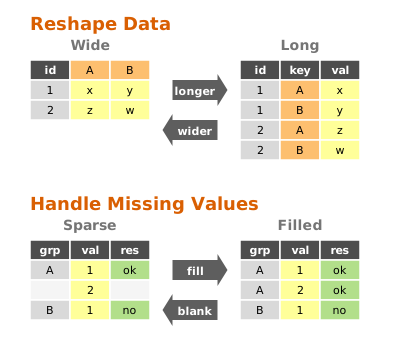
Data transformation involves changing the structure or values of a dataset. tva provides tools
for:
- Pivoting:
longer: Reshapes “wide” data (many columns) into “long” data (many rows).wider: Reshapes “long” data into “wide” data.
- Completion:
fill: Fills missing values with previous non-missing values (LOCF) or constants.blank: The inverse offill; replaces repeated values with empty strings (sparsify).
- Transposition:
transpose: Swaps rows and columns (matrix transposition).
longer (Wide to Long)
The longer command is designed to reshape “wide” data into a “long” format. “Wide” data often has
column names that are actually values of a variable. For example, a table might have columns like
2020, 2021, 2022 representing years. longer gathers these columns into a pair of key-value
columns (e.g., year and population), making the data “longer” (more rows, fewer columns) and
easier to analyze.
Basic Usage
tva longer [input_files...] --cols <columns> [options]
--cols/-c: Specifies which columns to reshape. You can use column names, indices ( 1-based), or ranges (e.g.,3-5,wk*).--names-to: The name of the new column that will store the original column headers ( default: “name”).--values-to: The name of the new column that will store the data values (default: “value”).
Examples
1. String Data in Column Names
Consider a dataset docs/data/relig_income.tsv where income brackets are spread across column
names:
religion	<$10k	$10-20k	$20-30k
Agnostic	27	34	60
Atheist	12	27	37
Buddhist	27	21	30
To tidy this, we want to turn the income columns into a single income variable:
tva longer docs/data/relig_income.tsv --cols 2-4 --names-to income --values-to count
Output:
religion	income	count
Agnostic	<$10k	27
Agnostic	$10-20k	34
Agnostic	$20-30k	60
...
2. Numeric Data in Column Names
The docs/data/billboard.tsv dataset records song rankings by week (wk1, wk2, etc.):
artist	track	wk1	wk2	wk3
2 Pac	Baby Don't Cry	87	82	72
2Ge+her	The Hardest Part	91	87	92
We can gather the week columns and strip the “wk” prefix to get a clean number:
tva longer docs/data/billboard.tsv --cols "wk*" --names-to week --values-to rank --names-prefix "wk" --values-drop-na
--names-prefix "wk": Removes “wk” from the start of the column names (e.g., “wk1” -> “1”).--values-drop-na: Drops rows where the rank is missing (empty).
Output:
artist	track	week	rank
2 Pac	Baby Don't Cry	1	87
2 Pac	Baby Don't Cry	2	82
...
3. Many Variables in Column Names (Regex Extraction)
Sometimes column names contain multiple pieces of information. For example, in the
docs/data/who.tsv dataset, columns like new_sp_m014 encode:
new: new cases (constant)sp: diagnosis methodm: gender (m/f)014: age group (0-14)
country	iso2	iso3	year	new_sp_m014	new_sp_f014
Afghanistan	AF	AFG	1980	NA	NA
We can use --names-pattern with a regular expression to extract these parts into multiple
columns:
tva longer docs/data/who.tsv --cols "new_*" --names-to diagnosis gender age --names-pattern "new_?(.*)_(.)(.*)"
--names-to: We provide 3 names for the 3 capture groups in the regex.--names-pattern: The regexnew_?(.*)_(.)(.*)captures:.*(diagnosis, e.g., “sp”).(gender, e.g., “m”).*(age, e.g., “014”)
Output:
country	iso2	iso3	year	diagnosis	gender	age	value
Afghanistan	AF	AFG	1980	sp	m	014	NA
...
4. Splitting Column Names with a Separator
If column names are consistently separated by a character, you can use --names-sep.
Consider a dataset docs/data/semester.tsv where columns represent year_semester:
student	2020_1	2020_2	2021_1
Alice	85	90	88
Bob	78	82	80
We can split the column names into two separate columns: year and semester.
tva longer docs/data/semester.tsv --cols 2-4 --names-to year semester --names-sep "_"
Output:
student	year	semester	value
Alice	2020	1	85
Alice	2020	2	90
Alice	2021	1	88
Bob	2020	1	78
Bob	2020	2	82
Bob	2021	1	80
wider (Long to Wide)
The wider command is the inverse of longer. It spreads a key-value pair across multiple columns,
increasing the number of columns and decreasing the number of rows. This is useful for creating
summary tables or reshaping data for tools that expect a matrix-like format.
Basic Usage
tva wider [input_files...] --names-from <column> --values-from <column> [options]
--names-from: The column containing the new column names.--values-from: The column containing the new column values.--id-cols: (Optional) Columns that uniquely identify each row. If not specified, all columns exceptnames-fromandvalues-fromare used.--values-fill: (Optional) Value to use for missing cells (default: empty).--names-sort: (Optional) Sort the new column headers alphabetically.--op: (Optional) Aggregation operation (e.g.,sum,mean,count,last). Default:last.
Comparison: stats vs wider
| Feature | stats (Group By) | wider (Pivot) |
|---|---|---|
| Goal | Summarize to rows | Reshape to columns |
| Output | Long / Tall | Wide / Matrix |
Example 1: US Rent and Income
Consider the dataset docs/data/us_rent_income.tsv:
GEOID	NAME	variable	estimate	moe
01	Alabama	income	24476	136
01	Alabama	rent	747	3
02	Alaska	income	32940	508
02	Alaska	rent	1200	13
Here, variable contains the type of measurement (income or rent), and estimate contains the
value. To make this easier to compare, we can widen the data:
tva wider docs/data/us_rent_income.tsv --names-from variable --values-from estimate
Output:
GEOID	NAME	moe	income	rent
01	Alabama	136	24476
01	Alabama	3		747
02	Alaska	508	32940
02	Alaska	13		1200
...
Understanding ID Columns:
By default, wider uses all columns except names-from and values-from as ID columns. In this
example, GEOID, NAME, and moe are treated as IDs.
Because moe (margin of error) is different for the income row (136) and the rent row (3),
wider keeps them as separate rows to preserve data.
To explicitly specify that only GEOID and NAME identify a row (and drop moe):
tva wider docs/data/us_rent_income.tsv --names-from variable --values-from estimate --id-cols GEOID,NAME
Example 2: Capture-Recapture Data (Filling Missing Values)
The docs/data/fish_encounters.tsv dataset describes when fish were detected by monitoring
stations. Some fish are seen at some stations but not others.
fish	station	seen
4842	Release	1
4842	I80_1	1
4842	Lisbon	1
4843	Release	1
4843	I80_1	1
4844	Release	1
If we widen this by station, we will have missing values for stations where a fish wasn’t seen. We
can use --values-fill to fill these gaps with 0.
tva wider docs/data/fish_encounters.tsv --names-from station --values-from seen --values-fill 0
Output:
fish	Release	I80_1	Lisbon
4842	1	1	1
4843	1	1	0
4844	1	0	0
Without --values-fill 0, the missing cells would be empty strings (default).
Complex Reshaping: Longer then Wider
Sometimes data requires multiple steps to be fully tidy. A common pattern is to make data longer to fix column headers, and then wider to separate variables.
Consider the docs/data/world_bank_pop.tsv dataset (a subset):
country	indicator	2000	2001
ABW	SP.URB.TOTL	42444	43048
ABW	SP.URB.GROW	1.18	1.41
AFG	SP.URB.TOTL	4436311	4648139
AFG	SP.URB.GROW	3.91	4.66
Here, years are in columns (needs longer) and variables are in the indicator column (needs
wider). We can pipe tva commands to solve this:
tva longer docs/data/world_bank_pop.tsv --cols 3-4 --names-to year --values-to value | \
tva wider --names-from indicator --values-from value
longer: Reshapes years (cols 3-4) intoyearandvalue.wider: Takes the stream, usesindicatorfor new column names, and fills them withvalue.countryandyearautomatically become ID columns.
Output:
country	year	SP.URB.TOTL	SP.URB.GROW
ABW	2000	42444	1.18
ABW	2001	43048	1.41
AFG	2000	4436311	3.91
AFG	2001	4648139	4.66
Handling Duplicates (Aggregation)
When widening data, you might encounter multiple rows for the same ID and name combination.
tidyr: Often creates list-columns or requires an aggregation function (values_fn).tva: Supports aggregation via the--opargument.
By default (--op last), tva overwrites previous values with the last observed value.
However, you can specify an operation to aggregate these values, similar to values_fn in tidyr
or crosstab in datamash.
Supported operations: count, sum, mean, min, max, first, last, median, mode,
stdev, variance, etc.
Example: Summing values
Example using docs/data/warpbreaks.tsv:
wool	tension	breaks
A	L	26
A	L	30
A	L	54
...
If we want to sum the breaks for each wool/tension pair:
tva wider docs/data/warpbreaks.tsv --names-from wool --values-from breaks --op sum
Output:
L	110	47
M	68	62
H	81	96
(For A-L: 26 + 30 + 54 = 110)
Example: Crosstab (Counting)
You can also use wider to create a frequency table (crosstab) by using --op count. In this case,
--values-from is optional. But to get a proper crosstab, you usually want to group by the other
factor (here, tension), so you should specify it as the ID column.
tva wider docs/data/warpbreaks.tsv --names-from wool --op count --id-cols tension
Output:
L	3	3
M	3	3
H	3	3
(Each combination appears 3 times in this dataset)
Comparison: stats vs wider (Aggregation)
Both tva stats (if available) and tva wider --op ... can aggregate data, but they produce
different structures:
| Feature | tva stats (Group By) | tva wider (Pivot) |
|---|---|---|
| Goal | Summarize data into rows | Reshape data into columns |
| Output Shape | Long / Tall | Wide / Matrix |
| Columns | Fixed (Group + Stat) | Dynamic (Values become Headers) |
| Best For | General summaries, reporting | Cross-tabulation, heatmaps |
Example: Data:
Group   Category    Value
A       X           10
A       Y           20
B       X           30
B       Y           40
tva stats (Sum by Group):
Group   Sum_Value
A       30
B       70
(Retains vertical structure)
tva wider (Sum, name from Category):
Group   X   Y
A       10  20
B       30  40
(Spreads categories horizontally)
fill (Fill Missing Values)
The fill command fills missing values in selected columns using the previous non-missing value (
Last Observation Carried Forward, or LOCF) or a constant. This is common in time-series data or
reports where values are only listed when they change.
Basic Usage
tva fill [options]
--field/-f: Columns to fill.--direction: Currently onlydown(default) is supported.--value/-v: If provided, fills with this constant value instead of the previous value.--na: String to consider as missing (default: empty string).
Example: Filling Down
Input docs/data/pet_names.tsv:
Pet	Name	Age
Dog	Rex	5
	Spot	3
Cat	Felix	2
	Tom	4
To fill the Pet column downwards:
tva fill -H -f Pet docs/data/pet_names.tsv
Output:
Pet	Name	Age
Dog	Rex	5
Dog	Spot	3
Cat	Felix	2
Cat	Tom	4
Example: Filling with Constant
To replace missing values with “Unknown”:
tva fill -H -f Pet -v "Unknown" docs/data/pet_names.tsv
blank (Sparsify / Inverse Fill)
The blank command replaces repeated values in selected columns with an empty string (or a custom
placeholder). This is the inverse of fill and is useful for creating human-readable reports where
repeated group labels are visually redundant.
Basic Usage
tva blank [options]
--field/-f: Columns to blank.--ignore-case/-i: Ignore case when comparing values.
Example
Input docs/data/blank_example.tsv:
Group	Item
A	1
A	2
B	1
Command:
tva blank -H -f Group docs/data/blank_example.tsv
Output:
Group	Item
A	1
	2
B	1
transpose (Matrix Transpose)
The transpose command swaps the rows and columns of a TSV file. It reads the entire file into
memory and performs a matrix transposition.
Basic Usage
tva transpose [input_file] [options]
Notes
- Strict Mode:
transposeexpects a rectangular matrix. All rows must have the same number of columns as the first row. If the file is jagged (rows have different lengths), the command will fail with an error. - Memory Usage: Since it reads the whole file, be cautious with very large files.
Examples
Transpose a table
Transpose docs/data/relig_income.tsv:
tva transpose docs/data/relig_income.tsv
Output (first 5 lines):
religion	Agnostic	Atheist	Buddhist
<$10k	27	12	27
$10-20k	34	27	21
$20-30k	60	37	30
$30-40k	81	25	34
Detailed Options
| Option | Description |
|---|---|
--cols <cols> | (Longer) Columns to reshape. Supports indices (1, 1-3), names (year), and wildcards (wk*). |
--names-to <names...> | (Longer) Name(s) for the new key column(s). |
--values-to <name> | (Longer) Name for the new value column. |
--names-prefix <str> | (Longer) String to remove from start of column names. |
--names-sep <str> | (Longer) Separator to split column names. |
--names-pattern <regex> | (Longer) Regex with capture groups for column names. |
--values-drop-na | (Longer) Drop rows where value is empty. |
--names-from <col> | (Wider) Column for new headers. |
--values-from <col> | (Wider) Column for new values. |
--id-cols <cols> | (Wider) Columns identifying rows. |
--values-fill <str> | (Wider) Fill value for missing cells. |
--names-sort | (Wider) Sort new column headers. |
--op <op> | (Wider) Aggregation operation (sum, mean, count, etc.). |
--field <cols> | (Fill/Blank) Columns to process. |
--direction <dir> | (Fill) Direction to fill (down is default). |
--value <val> | (Fill) Constant value to fill with. |
--na <str> | (Fill) String to treat as missing (default: empty). |
--ignore-case | (Blank) Ignore case when comparing values. |
Comparison with R tidyr
| Feature | tidyr::pivot_longer | tva longer |
|---|---|---|
| Basic pivoting | cols, names_to, values_to | Supported |
| Drop NAs | values_drop_na = TRUE | --values-drop-na |
| Prefix removal | names_prefix | --names-prefix |
| Separator split | names_sep | --names-sep |
| Regex extraction | names_pattern | --names-pattern |
| Feature | tidyr::pivot_wider | tva wider |
|---|---|---|
| Basic pivoting | names_from, values_from | Supported |
| ID columns | id_cols (default: all others) | --id-cols (default: all others) |
| Fill missing | values_fill | --values-fill |
| Sort columns | names_sort | --names-sort |
| Aggregation | values_fn | --op (sum, mean, count, etc.) |
| Multiple values | values_from = c(a, b) | Not supported (single column only) |
| Multiple names | names_from = c(a, b) | Not supported (single column only) |
| Implicit missing | names_expand, id_expand | Not supported |