to Command Documentation
The to command converts TSV (Tab-Separated Values) files into other formats (CSV, XLSX, Markdown).
Usage
tva to <SUBCOMMAND> [options]
Subcommands
csv: Convert TSV to CSV.xlsx: Convert TSV to XLSX.md: Convert TSV to Markdown.
tva to csv
Converts TSV files to Comma-Separated Values (CSV).
Usage
tva to csv [input] [options]
Options
-o <file>/--outfile <file>: Output filename (default: stdout).-d <char>/--delimiter <char>: Specify the output delimiter (default:,).
Examples
Convert TSV to CSV:
tva to csv docs/data/household.tsv
Output:
family,dob_child1,dob_child2,name_child1,name_child2
1,1998-11-26,2000-01-29,J,K
...
Convert TSV to semicolon-separated values:
tva to csv docs/data/household.tsv -d ";"
tva to xlsx
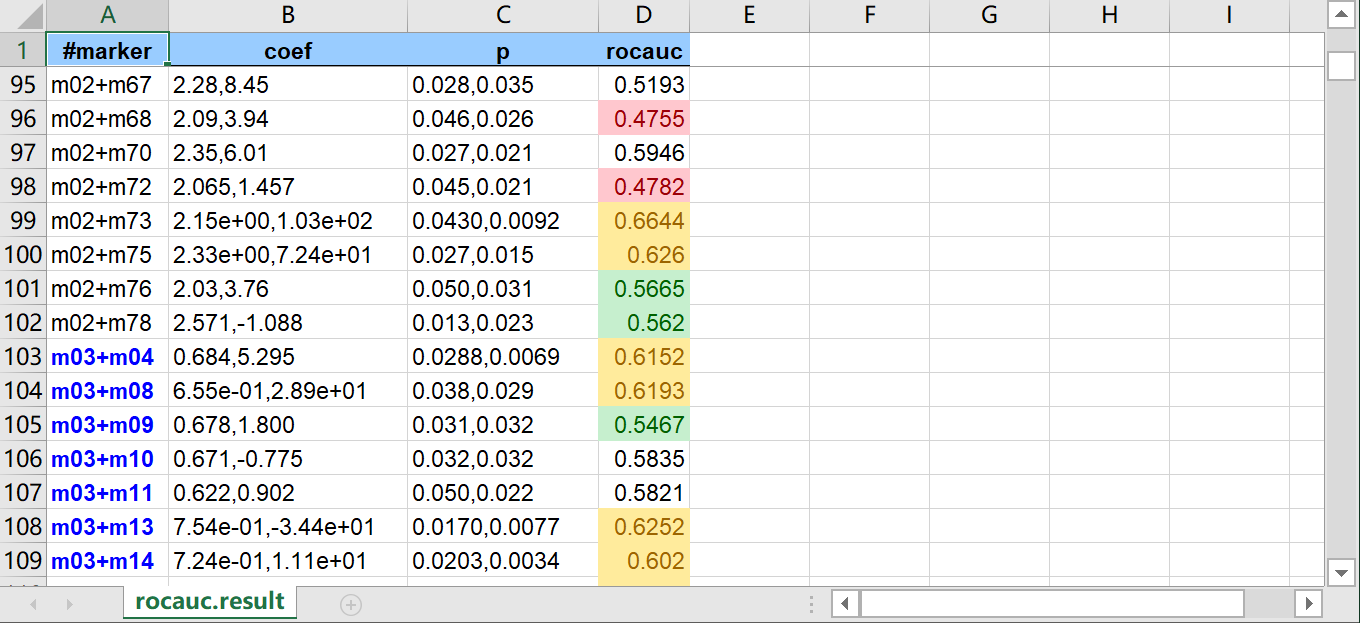
Converts TSV files to Excel (XLSX) spreadsheets. Supports conditional formatting.
Usage
tva to xlsx [input] [options]
Options
-o <file>/--outfile <file>: Output filename (default:output.xlsx).-H/--header: Treat the first line as a header.--le <col:val>: Format cells <= value.--ge <col:val>: Format cells >= value.--bt <col:min:max>: Format cells between min and max.--str-in-fld <col:val>: Format cells containing substring.
Examples
Convert TSV to XLSX:
tva to xlsx docs/data/household.tsv -o output.xlsx
Convert TSV to XLSX with formatting:
tva to xlsx docs/data/rocauc.result.tsv -o output.xlsx \
    -H --le 4:0.5 --ge 4:0.6 --bt 4:0.52:0.58 --str-in-fld 1:m03
tva to md
Converts a TSV file to a Markdown table, with support for column alignment and numeric formatting.
Usage
tva to md [file] [options]
Options
--num: Right-align numeric columns automatically.--fmt: Format numeric columns (thousands separators, fixed decimals) and implies--num.--digits <N>: Set decimal precision for--fmt(default: 0).--center <cols>/--right <cols>: Manually set alignment for specific columns (e.g.,1,2-4).
Examples
Basic markdown table:
tva to md docs/data/household.tsv
Output:
| family | dob_child1 | dob_child2 | name_child1 | name_child2 |
| ------ | ---------- | ---------- | ----------- | ----------- |
| 1      | 1998-11-26 | 2000-01-29 | J           | K           |
Format numbers with commas and 2 decimal places:
tva to md docs/data/us_rent_income.tsv --fmt --digits 2
Output:
| GEOID | NAME       | variable |  estimate |    moe |
| ----: | ---------- | -------- | --------: | -----: |
|  1.00 | Alabama    | income   | 24,476.00 | 136.00 |
|  1.00 | Alabama    | rent     |    747.00 |   3.00 |
|  2.00 | Alaska     | income   | 32,940.00 | 508.00 |
|  2.00 | Alaska     | rent     |  1,200.00 |  13.00 |

...